Every RAG workflow starts with the same step: source documents, usually PDFs, must be converted into text that a model can use. It is the least visible step in the pipeline, and the quality of everything after it depends on it. If tables come out scrambled and headings are lost, the chunking inherits both problems, and no embedding model fixes them downstream.
The standard approach is plain text extraction, with libraries such as pypdf. Extraction is fast and reliable on simple documents, and it breaks down on two-column layouts, complex tables, and scans. Docling, an open-source project from IBM Research, takes the other approach. Small AI models analyse each page to determine the layout, the reading order, and the table structure, and the result comes out as one structured document. The project (docling-project/docling) held 69,878 GitHub stars on October 30, 2026, is MIT-licensed, and had new code pushed that day. To measure what that approach delivers in practice, this test runs Docling on a local machine against a plain-extraction baseline, over three documents, a speech recording, and a video.
What Docling is
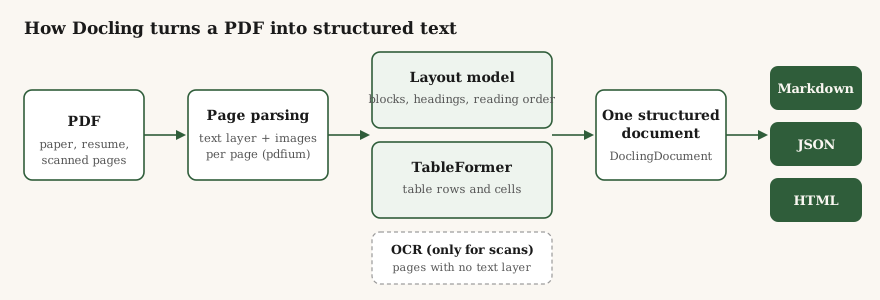
Docling is an open-source document-processing library from IBM Research. It converts complex, unstructured documents into structured, machine-readable data for generative AI and RAG workflows. PDF is only one of its inputs: it also parses DOCX, PPTX, and XLSX files, HTML, EPUB, images, and email files, plus audio and video, which it transcribes. Whatever goes in comes out as one structured document, exportable as Markdown, JSON, or HTML.
Docling is code, not a model: installing it gives you a library that runs a fixed pipeline over each document. The AI inside the pipeline is a set of small vision models, each with one job. A layout model, trained on IBM's DocLayNet dataset, finds the blocks on a page (headings, paragraphs, tables, pictures) and sets the reading order. TableFormer works out the rows and columns inside each table. An OCR engine reads pages that have no text layer. Together they came to 506 MB in this install. They run on an ordinary CPU, and none of them reads or reasons over the text the way a chat model does. Each element in the output also keeps its page number and bounding-box coordinates, so a chunk that retrieval surfaces can be traced back to the exact spot on the page it came from.
That also settles where GPT, Claude, or Gemini fit: they are not in this pipeline. Docling never calls an LLM to convert a page. A chat model enters after the conversion, reading the Markdown Docling produced, or above it, as an agent calling Docling as a tool. It ships an MCP server for that, plus ready integrations for LangChain, LlamaIndex, CrewAI, and Haystack. An optional second pipeline hands whole pages to a vision-language model instead (IBM ships a small local one, Granite-Docling); this test uses the standard pipeline.
Sending a PDF straight to a hosted model is the obvious alternative, and for a few pages it works well. At the scale of a document store it costs money per page, the same table can come back formatted differently on different runs, and client documents leave your machines. A fixed pipeline on your own hardware has the opposite profile: nothing per page, the same structure every run, and the documents stay put.
The test setup
I ran everything on my local machine: 2 CPU cores, 7 GB of RAM, no GPU. A modest machine by any standard. If a tool only performs on high-end hardware, that is worth knowing before it goes anywhere near a client's document store.
Versions: Docling 2.145.0 on Python 3.12, with PyTorch 2.15.0 underneath. The baseline is pypdf 6.21.4 doing plain extract_text().
Three documents:
- Docling's own technical report (arXiv 2408.09869), 9 pages, single-column, born-digital. The simple case, and a fair one: the tool, tested on its own paper.
- "Attention Is All You Need," the 2017 Transformer paper, 15 pages, two columns, with results tables. The case that breaks extractors.
- Page 1 of the same paper, rendered to an image at 200 DPI and saved back as a PDF, so it has no text layer at all. The scan case.
Installation
Installation is a single pip install docling. The first run downloads the models and loads them before it converts anything. There is no API key and no account, and nothing leaves the machine. One number is worth knowing before you plan around it. The finished environment is 6.1 GB, because PyPI's PyTorch wheel bundles CUDA libraries, so a machine with no GPU still downloads a dozen nvidia-* packages it will never load. Anyone putting this in a container image should pin the CPU build of PyTorch instead of taking the default wheel.
The run
The whole conversion is a few lines:
from docling.document_converter import DocumentConverter

converter = DocumentConverter()
result = converter.convert("attention-paper.pdf")
markdown = result.document.export_to_markdown()
Results
| Document | pypdf | Docling | What changed |
|---|---|---|---|
| Docling technical report, 9 pages | 0.94 s | 108.5 s (12.1 s/page) | Clean heading tree and 3 tables, but less raw text than pypdf |
| Transformer paper, 15 pages | 1.95 s | 100.5 s (6.7 s/page) | Reading order fixed. 4 tables recovered as Markdown |
| Scanned page 1, image only | 0 characters | 42.8 s, OCR on | The full page text, recovered |
On character counts, the two born-digital documents pull in opposite directions. Docling took about 25% more text out of the two-column paper than pypdf did: 48,951 characters against 39,599, most of the difference being the tables existing as structure instead of fragments. On the single-column report it took about 30% less: 34,063 against 48,824. The report's figures carry real text in the PDF layer, labels and captions inside diagrams, and Docling assigns those regions to pictures and leaves them out of the Markdown. Which output counts as complete depends on whether your pipeline needs the text inside figures.
The technical report: structure, at a price
pypdf extracted the whole report in under a second, all 48,824 characters. Docling took 108 seconds and returned the document as a heading tree of 22 headings:
## Docling Technical Report
## Abstract
## 1 Introduction
## 2 Getting Started
## 3 Processing pipeline
## 3.2 AI models
## 4 Performance
Headings are not decoration for a RAG pipeline. They are where a chunker should cut, and they become metadata (this chunk sits under Processing pipeline, in AI models) that retrieval can filter on. The report's three tables came back as Markdown tables as well.
The price is completeness. The text inside the report's figures, the diagram labels and the author affiliation lines on the title page, is real text in the PDF. pypdf returns it: "IBM Research" appears 11 times in its output and not once in Docling's Markdown, because the layout model assigned those regions to pictures. I also found one spot in the appendix where two text streams merge mid-word ("inclusion criwhile coverage"), a reading-order glitch on a dense figure page. None of this makes the conversion bad. It does mean that on a clean, single-column document, the model's decisions about what counts as content have to be checked rather than assumed.
The paper: where the models earn their keep
The abstract came back as flowing paragraphs in the right order, with the author footnotes placed after it instead of running through it, and the section headings intact. The clearest difference is Table 2, the results table. Docling returned it as a table:
| Model                    | BLEU - EN-DE | BLEU - EN-FR | Training Cost (FLOPs) - EN-DE |
|--------------------------|--------------|--------------|-------------------------------|
| ByteNet [18]             | 23.75        |              |                               |
| GNMT + RL [38]           | 24.6         | 39.92        | 2.3 · 1019                    |
| ConvS2S Ensemble [9]     | 26.36        | 41.29        | 7.7 · 1019                    |
| Transformer (base model) | 27.3         | 38.1         | 3.3 · 1018                    |
| Transformer (big)        | 28.4         | 41.8         | 2.3 · 1019                    |
pypdf returned the same table as flat lines:
ConvS2S Ensemble [9] 26.36 41.29 7.7 · 1019 1.2 · 1021
Transformer (base model) 27.3 38.1 3.3 · 1018
Transformer (big) 28.4 41.8 2.3 · 1019
Once those lines wrap or a row has an empty cell, the numbers detach from the columns they belong to. A model reading the pypdf version has to guess which BLEU score belongs to which language pair. A model reading the Markdown table does not.
Two imperfections I noticed. Superscripts flatten in both tools: the paper's 2.3 · 10¹⁹ comes out as "2.3 · 1019" everywhere, which would quietly corrupt any number a reader copies from either output. And rows with empty cells make wide, sparse tables that waste tokens. Neither flaw is unique to Docling, but the first one matters when numbers from tables feed anything downstream.
The scan: OCR works, and it is slow
On the image-only page, pypdf returns an empty string. There is nothing to extract. Turning OCR on is a small change:
from docling.datamodel.pipeline_options import PdfPipelineOptions

opts = PdfPipelineOptions()
opts.do_ocr = True
With that set, Docling ran RapidOCR over the page and gave back 2,737 characters in 42.8 seconds: the title as a heading, all eight authors with affiliations and email addresses, and the abstract. It read "Łukasz Kaiser" correctly, which I did not expect from a 200 DPI render. The output had one stray empty heading in it, so the OCR output needs a cleanup pass before it goes into an index. Still, the comparison is empty string versus a usable page.
Audio and video: speech in, text out
For audio, the test file was 11 seconds of speech: the John F. Kennedy clip the Whisper project ships as its standard test file: "And so, my fellow Americans, ask not what your country can do for you, ask what you can do for your country." Docling's ASR pipeline transcribed it with Whisper's base model, running locally.
The audio file came back word-perfect. The first conversion took 90 seconds, most of it the one-time download and loading of the speech model. Eleven seconds of clean, famous speech is the easy case for transcription, and I did not test noisy rooms or long recordings.
The video test used a 17-second clip of my desk: a book, a remote, and a watch, each picked up and named in the narration. The video pipeline transcribed the narration with the same Whisper model and sampled keyframes at a fixed four-second interval: five frames, at 0, 4, 8, 12, and 16 seconds, embedded in the document as pictures next to the text. The conversion took 42 seconds. The transcript came back as one chunk timestamped 0:00 to 0:17, word for word what was said. That includes a deliberate slip: I said "the five habit" instead of the book's title, "The High 5 Habit," to check whether the model would write what it heard or correct it toward the title it knows. It wrote what it heard. Speaker diarization was switched on and produced no labels. The run log states why: it needs extra packages (resemblyzer, soundfile, scikit-learn, and librosa) that were not installed, so the feature turned itself off.
What matters is the form of the result: a recording becomes a structured document in the same format as a PDF, its speech as timestamped text and its visuals as embedded frames, ready for the same chunking and indexing.
What the speed means in practice
On this machine the cost ran between 7 and 12 seconds a page, with the figure-heavy report at the expensive end. A 500-page manual is somewhere between one and two hours here. That makes Docling a batch tool: documents go through it when they arrive, overnight if needed, and the structured output is what the index stores. It does not belong in a request path where a user is waiting. A GPU or a bigger CPU will cut the time down.
Verdict
Go, for offline ingestion into RAG or search, when the documents carry tables, columns, or scans, or when the input is audio or video that has to become text. Run it as a batch step, pin the CPU build of PyTorch, and keep the structured JSON export rather than only the Markdown, so tables survive as data instead of text.
No-go, as a drop-in replacement for plain text extraction on simple documents, or anywhere near a user-facing request on CPU. The technical report took pypdf 0.94 seconds and Docling 108, and on that class of document the extra time bought structure while losing figure text. Pay it only when something downstream uses the structure.
Monitor, because the project is moving fast. Version 2.145.0 was current on the day of this test, and the repository had commits that day. The two things I am watching are CPU performance work, since 7 to 12 seconds a page is the main cost, and the vision-model pipeline.
This was one afternoon, five files, and one modest local machine. That is enough to know where Docling fits in my own stack and where it does not. If your documents are uglier than mine, and most real collections are, run it on your worst PDF rather than a clean sample. That is the only benchmark that transfers.