When I set out to build an AI system to answer complex engineering questions across SQL repositories, data warehouses, and operational trackers, I decided to spend less time benchmarking models and more time on something I could control: a modular architecture that gives reliable answers in production. That tradeoff worked out, but plenty of what follows I learned the hard way.
My first prototype was the classic single prompt with thirty tools attached, and it failed in all the predictable ways: hallucinated function arguments, exhausted context windows, and column names mixed up across databases. I don't think that was unusual — it's the natural first attempt, and those failure modes taught me what actually needed fixing.
The design that eventually worked splits the workload across five domain-isolated specialist agents governed by a root orchestrator on Vertex AI Agent Engine, paired with a lightweight Chat UI gateway on Cloud Run. Getting there meant working through practical problems around OpenTelemetry tracing, state decoupling, live reasoning streams, async garbage collection, token growth, and PII sanitization — most of which I only fully understood after they broke in production.
Here's how the system ended up looking, the bugs I ran into, and the patterns I'd reuse. Your stack will differ, but the failure modes rhyme.
System Architecture: Separating the UI Gateway from the Runtime
The biggest lesson from prototyping: keep context and runtime isolated. An agent that doesn't need the issue-tracker API schema to write a SQL query shouldn't have it in its prompt. And separating the web presentation layer from the agent execution graph made both sides easier to scale and debug. I ended up with three tiers:
- The Chat UI & Presentation Gateway (Cloud Run): A stateless Flask web application behind Google Identity-Aware Proxy (IAP) that handles multimodal uploads to Cloud Storage, manages session metadata, and streams live reasoning steps to the browser via Server-Sent Events (SSE).
- The Managed Agent Runtime (Vertex AI Agent Engine): The multi-agent orchestration graph packaged as an
AdkAppwith native OpenTelemetry instrumentation, where a root orchestrator handles intent routing and synthesis across five specialist sub-agents. - The Decoupled Data, Memory & Observability Plane: A persistent backing store for
VertexAiSessionServiceandVertexAiMemoryBankService, Cloud Trace for telemetry, and an event-driven Pub/Sub and Cloud DLP pipeline that scrubs sensitive data before indexing transcripts into Vertex AI Search.
Domain Sub-Agents and the Root Orchestrator
Instead of one monolithic prompt, I split the work across five specialist sub-agents. These map to my data stack — yours would look different, but the idea of grouping tools by domain transfers:
- Code Analysis Sub-Agent: Connects to Git repositories via REST API to traverse directory trees, inspect SQL files, and explain transformation logic.
- Schema & Lineage Sub-Agent: Resolves data dictionaries and maps column lineage from raw ingestion feeds to analytical gold tables.
- Warehouse Analytics Sub-Agent: Converts natural language into verified BigQuery SQL under strict guardrails (read-only permissions, mandatory partition filters, and zero guessing on business logic).
- Table Inspection Sub-Agent: Verifies data health by checking batch timestamps for freshness, duplicate keys, and null distributions.
- Project Operations Sub-Agent: Interfaces with the issue tracker via REST API to build dynamic JQL queries, file bug reports, and calculate turnaround metrics.
The Root Orchestrator is the only agent the user talks to directly. For a compound question — say, finding a metric's definition in Git and checking whether its warehouse table refreshed today — it delegates to the Code Analysis and Table Inspection specialists in sequence, then merges their outputs, SQL snippets, and Vega-Lite chart specs into a single response. For follow-up questions it routes back to the specialist that handled the previous turn instead of guessing from a summary. That last part took me longer to get right than I'd like to admit.
Tech Stack & Runtime
- Agent Framework & Compute: Google ADK on Managed Vertex AI Agent Engine
- App Hosting & UI: FastAPI / Flask gateway on Cloud Run
- State & Memory: Vertex AI Session Service and Vertex AI Memory Bank Service
- Data & Analytics: BigQuery and Gemini Data Analytics Service (NL-to-SQL)
- Models:
gemini-2.5-pro,gemini-2.5-flash(or your target Gemini model versions) - Observability & Security: OpenTelemetry, Cloud Trace, and Cloud DLP
- RAG & Search: BigQuery Data Store + Vertex AI Search (with native embeddings)
I packaged the orchestrator graph into a Vertex AI AdkApp template (deploy_agent_engine.py) with enable_tracing=True. On the frontend, the Cloud Run container (start.sh) runs the Flask gateway (chat_adapter.py), validates user identity via IAP headers (X-Goog-Authenticated-User-Email), and streams multimodal queries from the remote Agent Engine over SSE:
class AgentPlatformBackend:
    """Manages connection and streaming execution against Vertex AI Agent Engine Runtime."""
    def get_engine(self):
        with self._lock:
            if self._engine is None:
                vertexai.init(project=self.project, location=self.location)
                self._engine = agent_engines.get(self.engine_id)
            return self._engine

    def stream_query(self, message_parts, user_id, session_id):
        engine = self.get_engine()
        return engine.stream_query(
            message={"role": "user", "parts": message_parts},
            user_id=user_id,
            session_id=session_id,
        )
Multi-Agent Observability with OpenTelemetry
In a multi-agent system, a single user prompt can trigger intent classification, sub-agent handoffs, multiple tool calls, self-correction retries, and final synthesis. The first time a turn took 25 seconds and burned 80,000 tokens, I had no way to say why. That was the moment I added distributed tracing.
I instrumented the runtime using google-adk[otel-gcp], opentelemetry-instrumentation-google-genai, and opentelemetry-util-genai, exporting spans to Google Cloud Trace:
adk_app = AdkApp(
    app=orchestration_app,
    session_service_builder=session_service_builder,
    memory_service_builder=memory_service_builder,
    enable_tracing=True,
)

env_vars = {
    "GOOGLE_CLOUD_AGENT_ENGINE_ENABLE_TELEMETRY": "true",
    "OTEL_SEMCONV_STABILITY_OPT_IN": "gen_ai_latest_experimental",
    "OTEL_INSTRUMENTATION_GENAI_CAPTURE_MESSAGE_CONTENT": "EVENT_ONLY",
}
Once tracing was on, six things became visible that I'd previously been guessing at:
- Per-Agent Token Attribution (
gen_ai.usage.*): Breaks down exact input and output tokens by sub-agent, turn, and model call when billing spikes occur. - Early Context Bloat Detection: Showed
input_tokensjumping from ~3,500 to over 45,000 within four steps when the Code Analysis Sub-Agent fetched multiple SQL files, which drove me to implement context caching, compaction, and output truncation. - Catching Silent Tool Retries: Surfaces failed
execute_toolspans when an agent quietly rewrites bad SQL or JQL across multiple attempts, helping me fix ambiguous tool docstrings. - End-to-End Latency Waterfalls: Separates LLM inference time from external I/O bottlenecks across GitHub REST calls, BigQuery execution, and session preloading.
- Spotting Sub-Agent Routing Loops: Visualizes the
invoke_agent→transfer_to_agent→execute_toolcall hierarchy to catch redundant handoffs between specialists. - Privacy-Safe Telemetry (
EVENT_ONLY): Keeps trace spans lightweight while emitting message content strictly as IAM-governed telemetry events rather than raw application logs.
Closed-Loop RAG, PII Sanitization, and Analytics
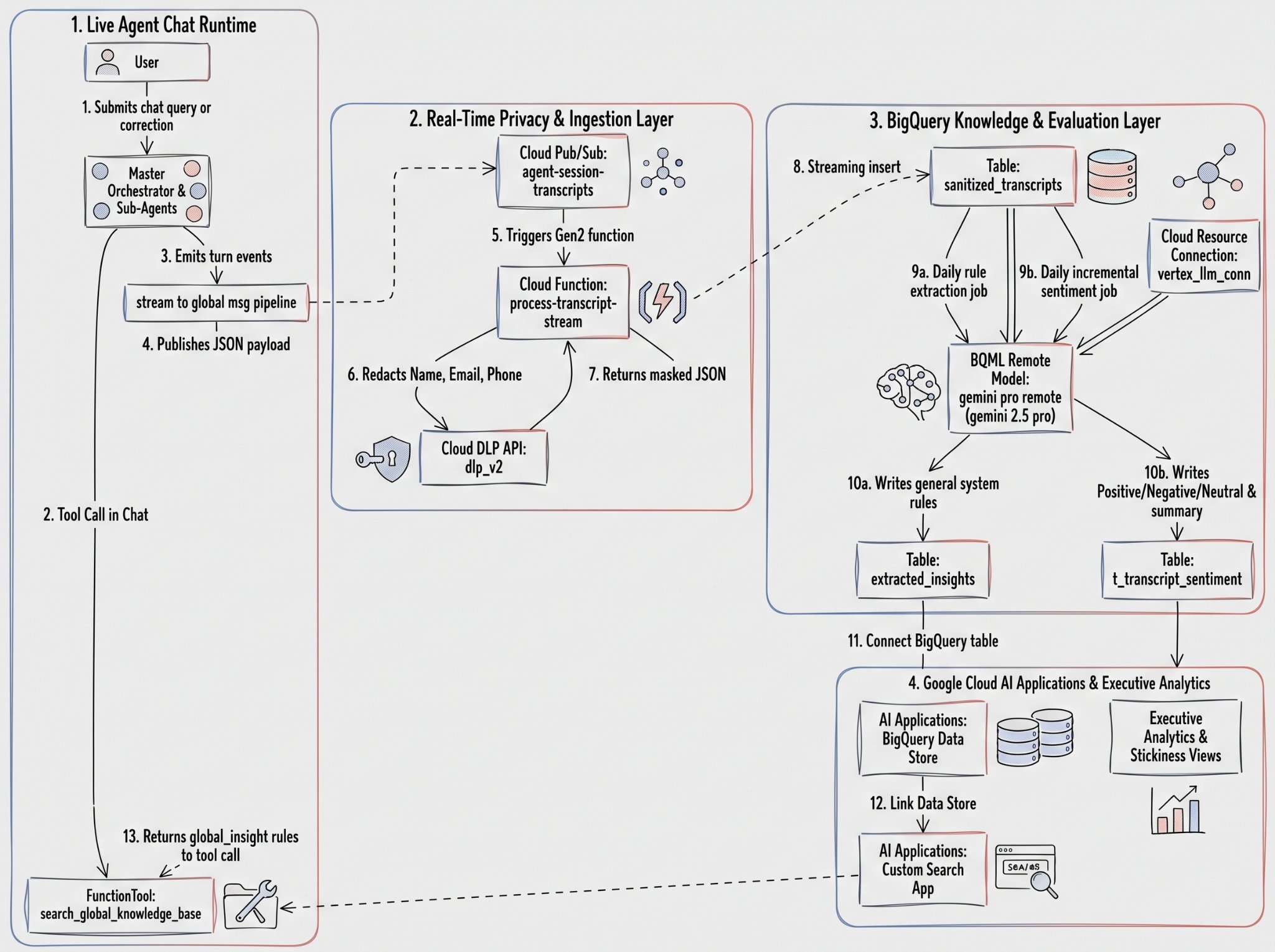
I wanted the system to get smarter from real troubleshooting sessions without leaking anything sensitive into the search index. The pipeline I landed on — Pub/Sub, Cloud Functions, Cloud DLP, BigQuery ML (gemini-2.5-pro), and Vertex AI Search — extracts reusable rules from user corrections and tracks session sentiment and user stickiness (DAU/WAU/MAU). The privacy half of it took a few iterations to get right.
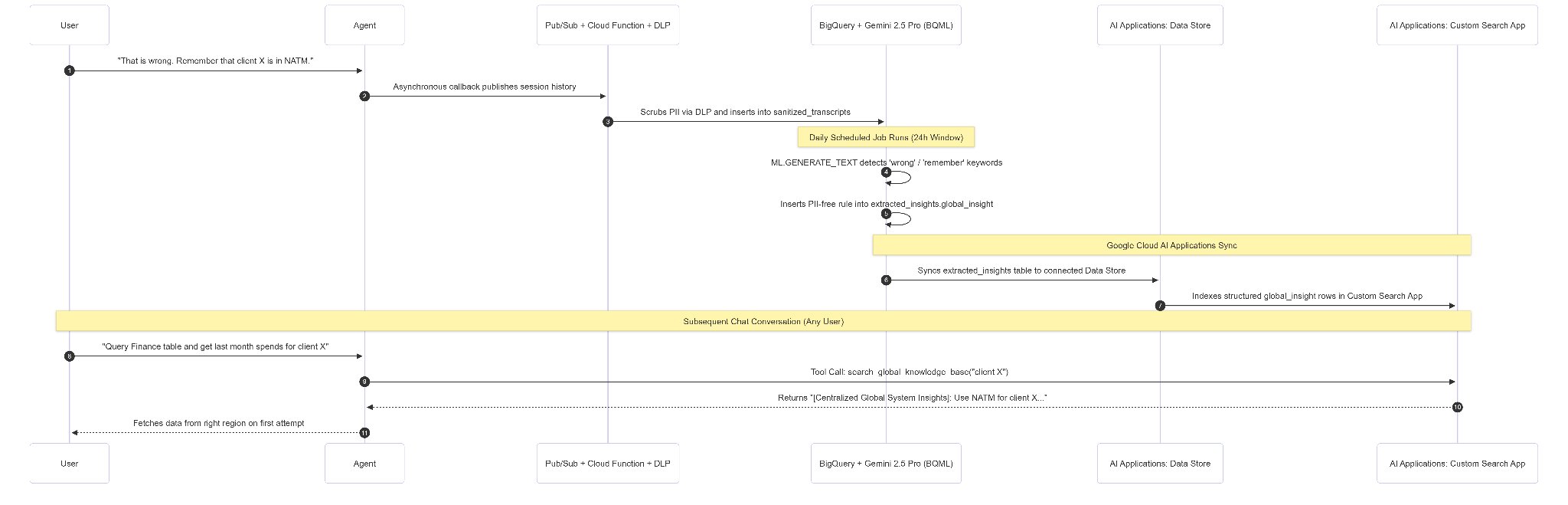
Here's how a user correction becomes a reusable rule, without slowing down the chat:
- Non-Blocking Capture: When a user corrects the agent (e.g., "Client X is in NATM"), the
after_agent_callback(stream_to_global_rag_pipeline) publishes the turn transcript asynchronously to a Pub/Sub topic (agent-session-transcripts). - Cloud DLP Sanitization: A Gen2 Cloud Function (
process-transcript-stream) consumes the message, calls Cloud DLP (dlp_v2) to mask names, emails, and phone numbers, and streams the sanitized JSON into thesanitized_transcriptsBigQuery table:
def scrub_pii(text_content: str, project_id: str) -> str:
    """Invokes Cloud DLP to replace names, emails, and phone numbers with placeholders."""
    parent = f"projects/{project_id}"
    inspect_config = {
        "info_types": [
            {"name": "PERSON_NAME"},
            {"name": "EMAIL_ADDRESS"},
            {"name": "PHONE_NUMBER"}
        ]
    }
    deidentify_config = {
        "info_type_transformations": {
            "transformations": [{
                "primitive_transformation": {
                    "replace_with_info_type_config": {}
                }
            }]
        }
    }
    response = dlp_client.deidentify_content(
        request={
            "parent": parent,
            "deidentify_config": deidentify_config,
            "inspect_config": inspect_config,
            "item": {"value": text_content},
        }
    )
    return response.item.value
- Batch Rule Extraction & Indexing: A daily BigQuery ML job runs
ML.GENERATE_TEXT(gemini-2.5-pro) over the last 24 hours of sanitized transcripts, writing reusable system rules toextracted_insightsand sentiment summaries tot_transcript_sentiment. The rules automatically sync to a Vertex AI Search data store. - Runtime Retrieval: On future queries about Client X, the orchestrator calls
search_global_knowledge_base, retrieves the corrected regional rule, and queries the right table on the first try.
Production Realities and Engineering Hurdles
Production surfaced four issues my local notebooks never showed. Each one took longer to diagnose than I'd like to admit.
Hurdle 1: Decoupling Compute Deployments from Session State
Every redeployment generates a new Engine ID, and my first setup pointed VertexAiSessionService and VertexAiMemoryBankService at the active compute Engine ID — so each deploy cut users off from their chat history and long-term memories. Obvious in hindsight; painful at the time.
The fix was splitting the configuration into two environment variables: AGENT_RUNTIME_ENGINE_ID for the active compute instance, and PERSISTENT_DATA_ENGINE_ID for an unchanging Agent Engine resource dedicated to state storage:
def session_service_builder():
    return VertexAiSessionService(
        project=os.environ.get("GOOGLE_CLOUD_PROJECT"),
        location=os.environ.get("GOOGLE_CLOUD_REGION", "europe-west1"),
        agent_engine_id=os.environ.get("PERSISTENT_DATA_ENGINE_ID"),
    )

def memory_service_builder():
    return VertexAiMemoryBankService(
        project=os.environ.get("GOOGLE_CLOUD_PROJECT"),
        location=os.environ.get("GOOGLE_CLOUD_REGION", "europe-west1"),
        agent_engine_id=os.environ.get("PERSISTENT_DATA_ENGINE_ID"),
    )
With this split-engine setup, I can update or blue-green test the compute runtime without orphaning user sessions.
Hurdle 2: Real-Time Reasoning Visibility and In-Flight Tracking
Nobody trusts a loading spinner that sits for twenty seconds before returning a SQL table — and refreshing the browser mid-generation shouldn't drop the response. I had both problems.
In the Chat UI gateway, I built an event parser (extract_event_thoughts) paired with a thread-safe ActiveSessionTracker:
- It formats
transfer_to_agentevents as delegation steps in the UI thought accordion. - It streams intermediate
functionCall,functionResponse, and<thought>blocks immediately via SSE. - It tracks in-flight progress (with a 15-minute timeout) and interleaves sub-agent trace deltas (
temp:_sub_agent_trace_*) so/api/historycan reconstruct the live reasoning chain if a user reloads the page.
Hurdle 3: Fixing the Async Garbage Collection Bug in Memory Generation
In production, long-term memories triggered by after_agent_callback were intermittently failing to index without throwing errors. Because the memory client ran as a fire-and-forget background task, the underlying async HTTP client was occasionally garbage-collected when the turn context exited, severing the connection mid-write.
The fix: await add_events_to_memory inside the callback while passing {"wait_for_completion": False} in custom_metadata:
async def generate_memories_callback(callback_context: CallbackContext):
    """Triggers memory generation safely within the turn lifecycle."""
    if callback_context.session:
        await callback_context.add_events_to_memory(
            events=callback_context.session.events,
            custom_metadata={"wait_for_completion": False}
        )
    return None
This keeps the HTTP dispatch inside the active event loop while letting Vertex AI handle memory indexing asynchronously on the backend.
Hurdle 4: Controlling Latency and Token Bloat
To keep multi-turn histories and large SQL payloads from exhausting the context window, I enabled two native ADK controls on the App container:
orchestration_app = App(
    name="orchestrator_app",
    root_agent=root_orchestrator,
    context_cache_config=ContextCacheConfig(
        min_tokens=2048,
        ttl_seconds=1800,   # 30-minute cache TTL for interactive sessions
        cache_intervals=5,  # Refresh cache checkpoint every 5 invocations
    ),
    events_compaction_config=EventsCompactionConfig(
        compaction_interval=10,  # Summarize older events every 10 turns
        overlap_size=2,          # Retain last 2 turns uncompressed for continuity
    ),
)
Once a session exceeds 2,048 tokens, ContextCacheConfig caches static history for 30 minutes to cut time-to-first-token, while EventsCompactionConfig summarizes older turns every 10 invocations while keeping the last 2 turns intact.
Architectural Takeaways
If you're building something similar, these are the six things I'd do from the start — they would have saved me months:
- Isolate specialists by domain: Group tools by data access layer and keep the root orchestrator focused strictly on routing and synthesis.
- Separate the UI gateway from the agent runtime: Run your web and SSE gateway on stateless Cloud Run while delegating execution to Vertex AI Agent Engine.
- Instrument OpenTelemetry on day one: Track per-agent token usage, silent tool retries, and external API bottlenecks with
google-adk[otel-gcp]. - Decouple compute and data Engine IDs: Point session and memory services to a dedicated persistent Engine ID so code deployments never wipe out state.
- Stream intermediate reasoning to the UI: Expose sub-agent handoffs and tool calls over SSE so users can verify how an answer was generated.
- Sanitize transcripts out-of-band: Use Pub/Sub and Cloud DLP to strip PII asynchronously before indexing conversation insights into search.
None of this was about clever prompting. Treating the agents like a distributed system — with real boundaries around context, state, observability, and privacy — is what made it hold up. I'm still finding the next sharp edge.